" height="19px" id="Jc3VJwDiz" transform="translate(2.5 2.5)" width="19px"/></svg>)
" height="15.5px" id="wTjNrWZTm" transform="translate(3.5 4.5)" width="17.49964368157675px"/></svg>)

Translate On-screen Text in Videos — in Minutes
Translate On-screen Text in Videos — in Minutes
Translate On-screen Text in Videos — in Minutes
Translate On-screen Text in Videos — in Minutes
Meet Visual Translate — it automatically detects, erases, and translates on-screen text in videos, rebuilding it in your target language. No original project files required.
Meet Visual Translate — it automatically detects, erases, and translates on-screen text in videos, rebuilding it in your target language. No original project files required.
Meet Visual Translate — it automatically detects, erases, and translates on-screen text in videos, rebuilding it in your target language. No original project files required.



Trusted by 7M+ creators and companies in 40+ countries.

















Trusted by 7M+ creators and companies in 40+ countries.
Trusted by 7M+ creators and companies in 40+ countries.
Trusted by 7M+ creators and companies in 40+ countries.
Trusted by 7M+ creators and companies in 40+ countries.
Trusted by 7M+ creators and companies in 40+ countries.
Why Visual Translate Matters
Why Visual Translate Matters
Why Visual Translate Matters
A more complete way to localize videos — built for real production workflows.
A more complete way to localize videos — built for real production workflows.
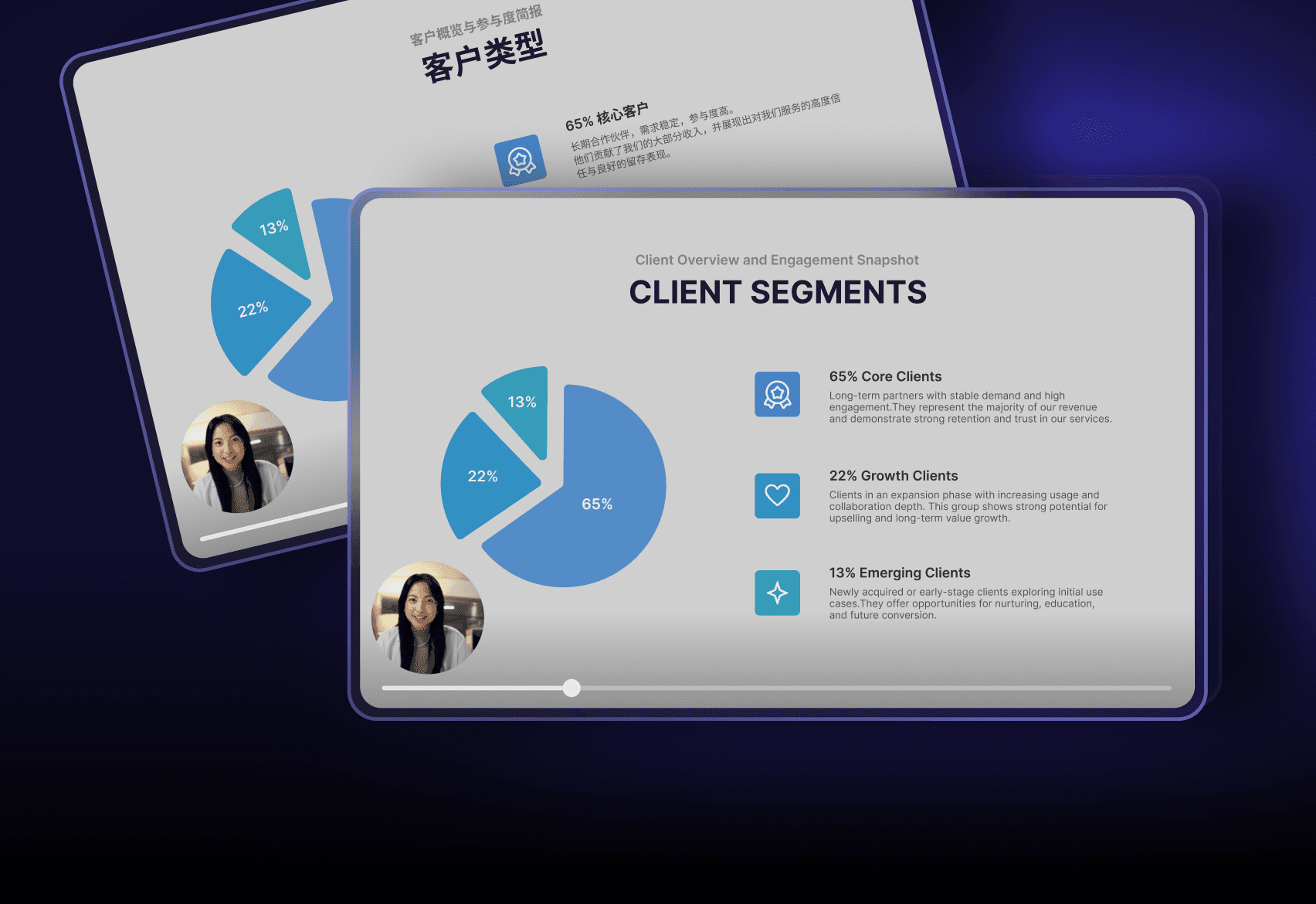
Translate What Viewers Actually See
Most “video translation” only changes audio/subtitles. Visual Translate localizes the visual layer viewers read and rely on.
Most “video translation” only changes audio/subtitles. Visual Translate localizes the visual layer viewers read and rely on.
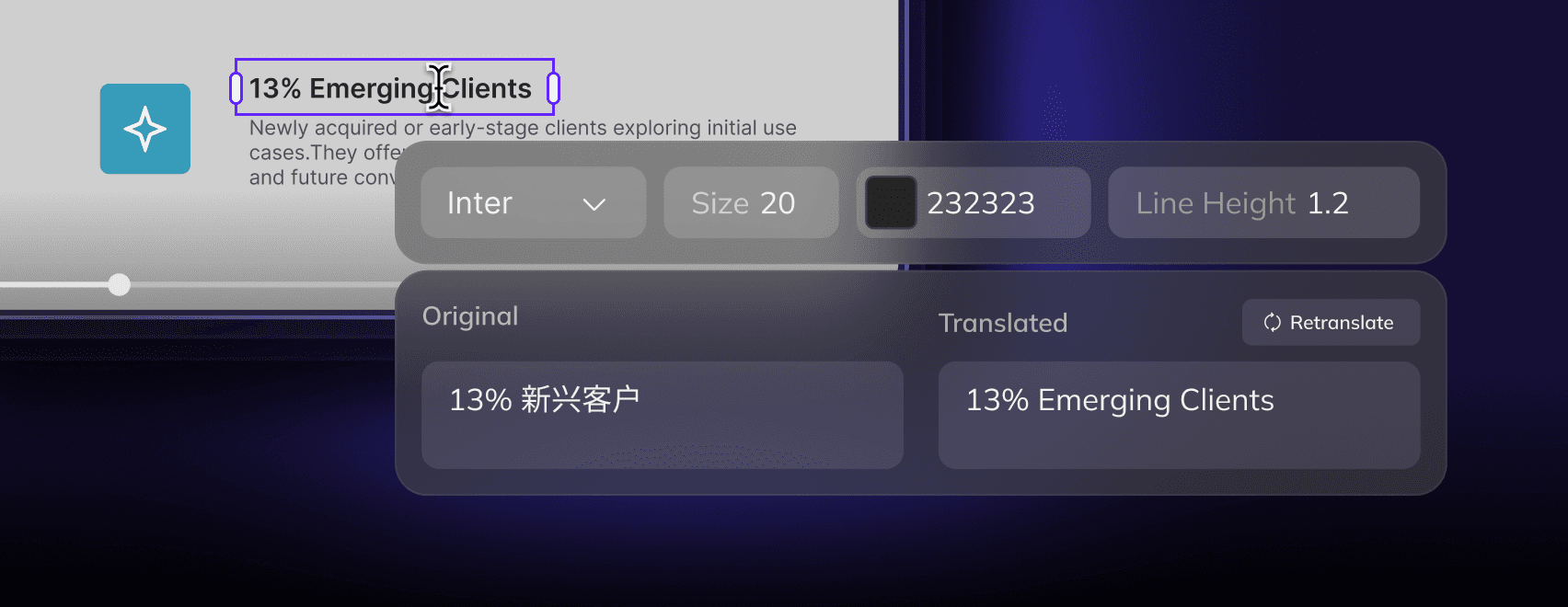
Editable & Controllable
Review and refine translations before export, so you can ensure accuracy and consistency — and publish with confidence.
Editable & Controllable
Review and refine translations before export, so you can ensure accuracy and consistency — and publish with confidence.
Editable & Controllable
Review and refine translations before export, so you can ensure accuracy and consistency — and publish with confidence.

Not a Dead End
Finish Visual Translate first, then continue to Subtitles / Dubbing / Lip Sync to complete your localized deliverable.
Finish Visual Translate first, then continue to Subtitles / Dubbing / Lip Sync to complete your localized deliverable.
Choose a Scenario to Try
Choose a Scenario to Try
Choose a Scenario to Try
Pick a scenario → run a sample → get a result in minutes.
Pick a scenario → run a sample → get a result in minutes.

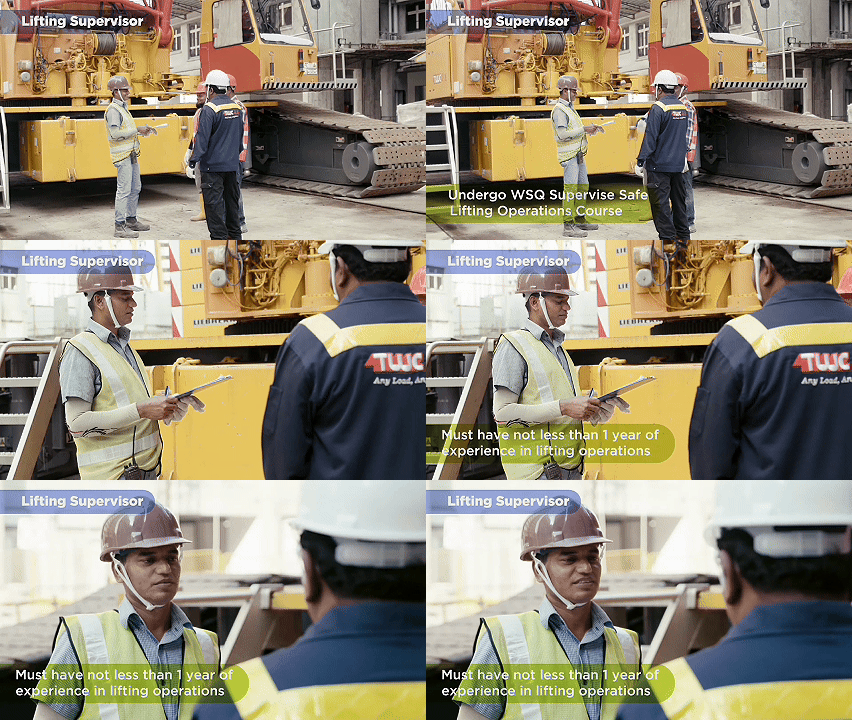
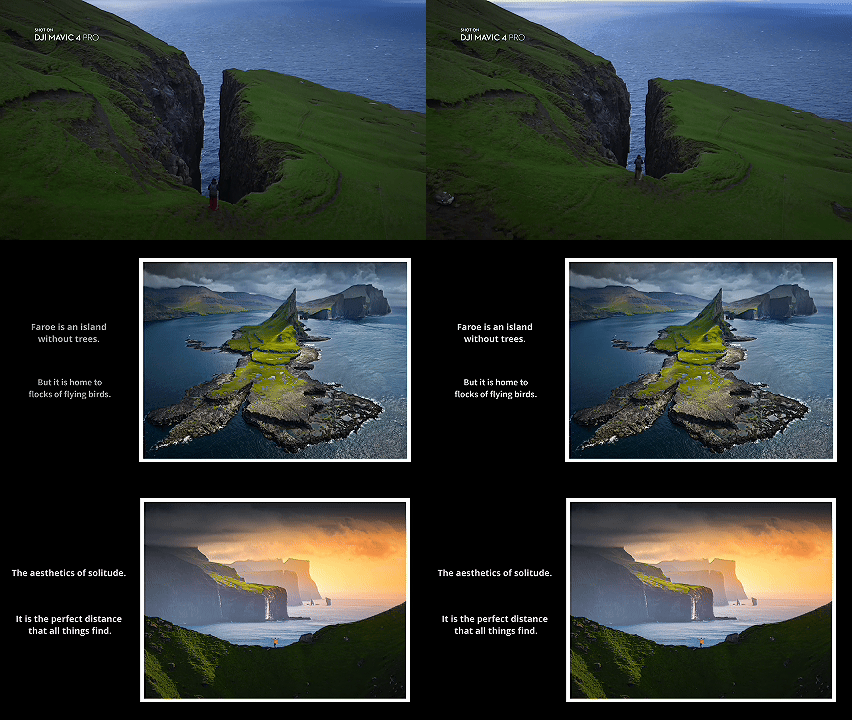
Inside Visual Translate
Inside Visual Translate
Inside Visual Translate
Detect → translate → rebuild on-screen text.
Then proofread before exporting.
Detect → translate → rebuild on-screen text.
Then proofread before exporting.
STEP 1
Detect On-screen Text
Detect On-screen Text
Find the visual text viewers read — slides, labels, titles, annotations.
Find the visual text viewers read — slides, labels, titles, annotations.
STEP 2
Translate with Context
Localize meaning and terminology consistently, aligned with the video’s intent.
STEP 2
Translate with Context
Localize meaning and terminology consistently, aligned with the video’s intent.
STEP 3
Rebuild & Proofread
Erase the original text and rebuild the visual layer in the target language — then review and refine in the editor.
STEP 3
Rebuild & Proofread
Erase the original text and rebuild the visual layer in the target language — then review and refine in the editor.
Full Editing Control for Every Text Element
Full Editing Control for Every Text Element
Full Editing Control for Every Text Element
Review, refine, and perfect your on-screen translations with a powerful, easy-to-use editor.
Review, refine, and perfect your on-screen translations with a powerful, easy-to-use editor.
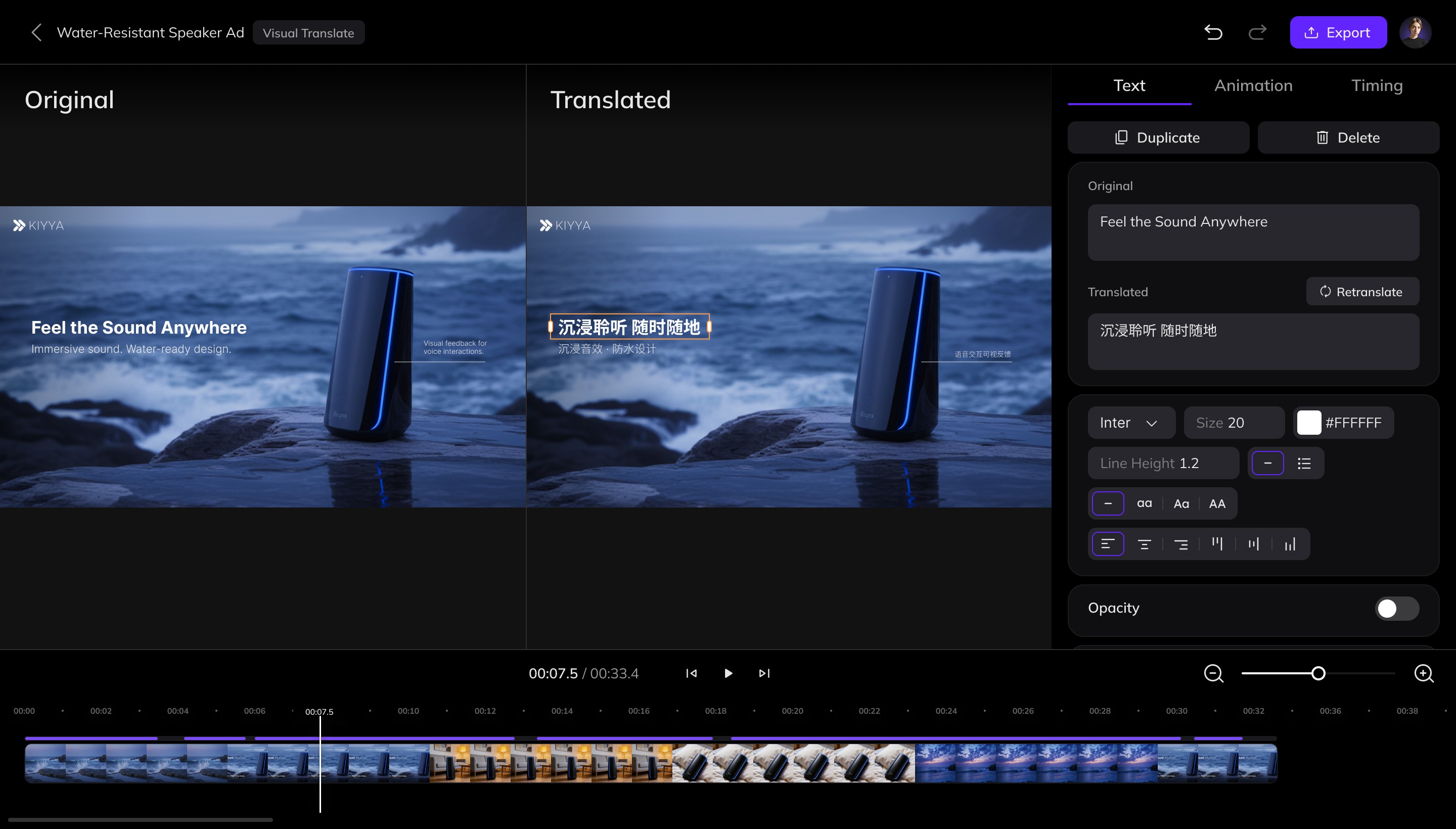
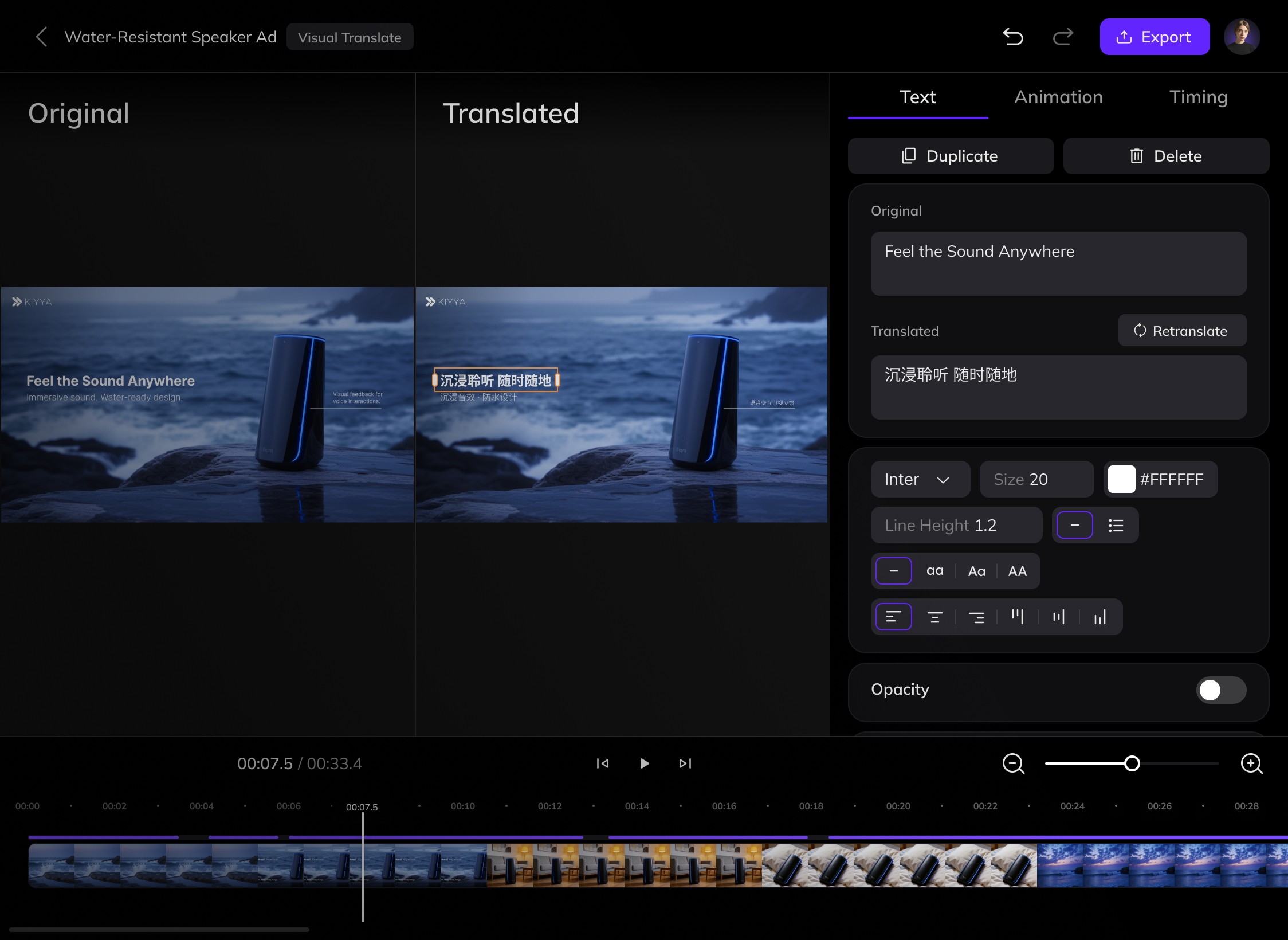
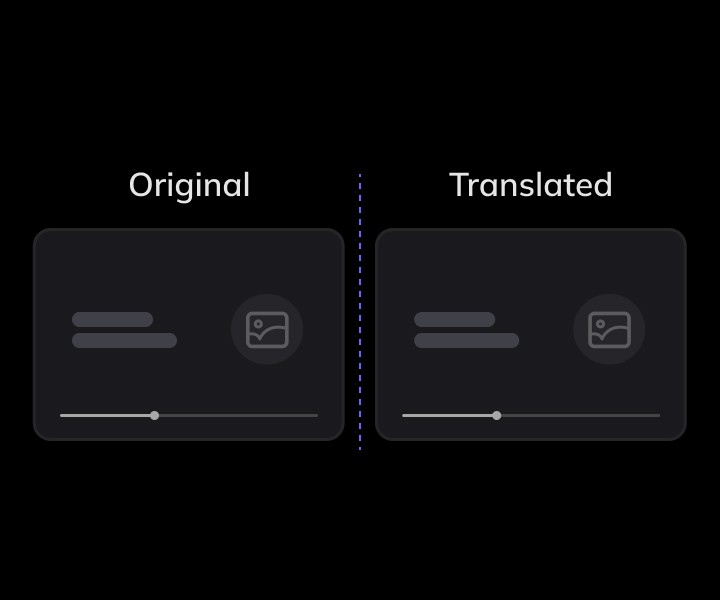
Side-by-Side Comparison
Side-by-Side Comparison
See the original and translated on-screen text together, so you can quickly check meaning, placement, and context.
See the original and translated on-screen text together, so you can quickly check meaning, placement, and context.
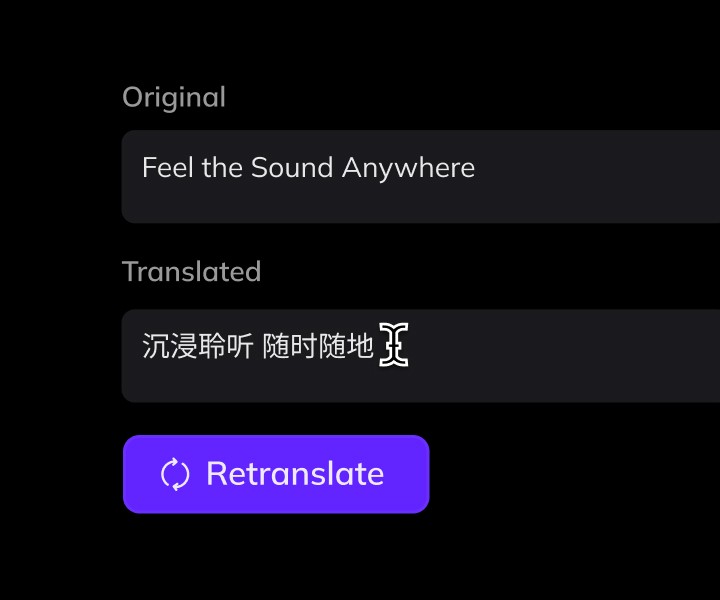
Edit & Re-translate Anytime
Edit & Re-translate Anytime
Update the original text to retranslate, or directly edit the translated text to get the tone, wording, or level of formality you want.
Update the original text to retranslate, or directly edit the translated text to get the tone, wording, or level of formality you want.
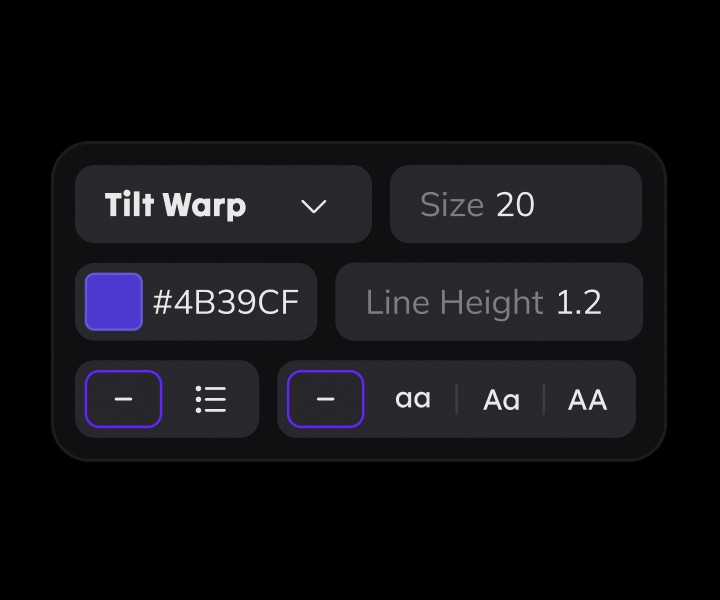
Flexible Text Styling
Flexible Text Styling
Adjust font, size, color, and layout so translated text matches your brand and stays readable in every scene.
Adjust font, size, color, and layout so translated text matches your brand and stays readable in every scene.
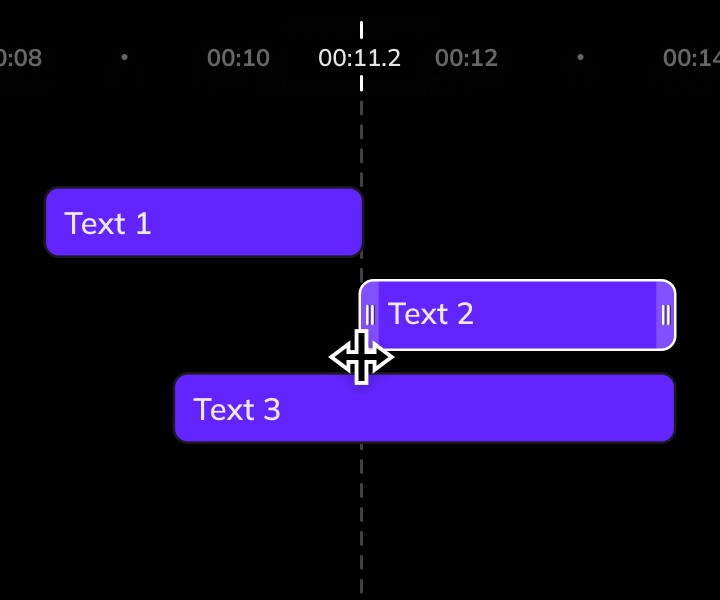
Animation & Timing Control
Animation & Timing Control
Fine-tune when text appears, how long it stays, and how it animates to keep everything perfectly in sync with the video.
Fine-tune when text appears, how long it stays, and how it animates to keep everything perfectly in sync with the video.


What’s Next after Visual Translate
What’s Next after Visual Translate
What’s Next after Visual Translate
Continue to subtitles, dubbing, and lip sync to finish deliverables.
Continue to subtitles, dubbing, and lip sync to finish deliverables.
Add Subtitles
Pair localized visuals with subtitles for maximum clarity and accessibility.
Add Subtitles
Pair localized visuals with subtitles for maximum clarity and accessibility.
Add Subtitles
Complete a short form to join the Beta.
Add Dubbing
Clone the original voice and dub it into the target language to complete the audio localization.
Add Dubbing
Clone the original voice and dub it into the target language to complete the audio localization.
Add Lip Sync
Match lip movements to the new audio for studio-quality localization.
Add Lip Sync
Match lip movements to the new audio for studio-quality localization.
Enterprise Solutions
Enterprise-ready for Global Teams
" height="18.934700066528322px" id="jlhVNiHj0" transform="translate(0.5 2.5)" width="22.67206840939579px"/></svg>)
Team Workspaces & Admin Controls
Manage projects, assign roles, and collaborate securely within shared team environments.
" height="19.999987711869935px" id="QF9d5BoyW" transform="translate(3.25 2)" width="17px"/></svg>)
Security, Compliance & Privacy
Built with SOC 2 Type II controls and GDPR-aligned data handling — ensuring your content and user data remain secure and confidential.
" height="20.75px" id="xYpbRJ20t" transform="translate(1 1.5)" width="22px"/></svg>)
Dedicated Enterprise Support
Get prioritized assistance and faster response times from Vozo’s enterprise support team.
Enterprise Solutions
Enterprise-ready for Global Teams
Team Workspaces & Admin Controls
Manage projects, assign roles, and collaborate securely within shared team environments.
Security, Compliance & Privacy
Built with SOC 2 Type II controls and GDPR-aligned data handling — ensuring your content and user data remain secure and confidential.
Dedicated Enterprise Support
Get prioritized assistance and faster response times from Vozo’s enterprise support team.
Enterprise Solutions
Enterprise-ready for Global Teams
Team Workspaces & Admin Controls
Manage projects, assign roles, and collaborate securely within shared team environments.
Security, Compliance & Privacy
Built with SOC 2 Type II controls and GDPR-aligned data handling — ensuring your content and user data remain secure and confidential.
Dedicated Enterprise Support
Get prioritized assistance and faster response times from Vozo’s enterprise support team.
Enterprise Solutions
Enterprise-ready for Global Teams
Team Workspaces & Admin Controls
Manage projects, assign roles, and collaborate securely within shared team environments.
Security, Compliance & Privacy
Built with SOC 2 Type II controls and GDPR-aligned data handling — ensuring your content and user data remain secure and confidential.
Dedicated Enterprise Support
Get prioritized assistance and faster response times from Vozo’s enterprise support team.
Enterprise Solutions
Enterprise-ready for Global Teams
Team Workspaces & Admin Controls
Manage projects, assign roles, and collaborate securely within shared team environments.
Security, Compliance & Privacy
Built with SOC 2 Type II controls and GDPR-aligned data handling — ensuring your content and user data remain secure and confidential.
Dedicated Enterprise Support
Get prioritized assistance and faster response times from Vozo’s enterprise support team.
Enterprise Solutions
Enterprise-ready for Global Teams
Team Workspaces & Admin Controls
Manage projects, assign roles, and collaborate securely within shared team environments.
Security, Compliance & Privacy
Built with SOC 2 Type II controls and GDPR-aligned data handling — ensuring your content and user data remain secure and confidential.
Dedicated Enterprise Support
Get prioritized assistance and faster response times from Vozo’s enterprise support team.
Visual Translate Resources
Visual Translate Resources
Learn More About Visual Translate
Learn More About Visual Translate


FAQs for Vozo AI Visual Translate
FAQs for Vozo AI Visual Translate
FAQs for Vozo AI Visual Translate
What is Visual Translate?
" height="17.5px" id="Ezhb8Su41" transform="translate(7.5 3.5) rotate(90 4.75 8.75)" width="9.5px"/></svg>)
Visual Translate translates videos that contain clear on-screen titles, labels, or explanatory text with simple styles and animations. It works best for training, educational, and product demo videos.
What is Visual Translate?
Visual Translate translates videos that contain clear on-screen titles, labels, or explanatory text with simple styles and animations. It works best for training, educational, and product demo videos.
Does Visual Translate translate all text in a video?
No. Visual Translate detects and translates explanatory on-screen text that is added to help explain, guide, or annotate the video content.
This includes:
Text on slides shown in videos
Text overlays added during video editing (excluding brand logos)
Embedded subtitles
The following types of text are not supported:
UI elements such as software interfaces, buttons, or menus
Real-world text such as packaging, signage, or text on physical objects
Does Visual Translate translate all text in a video?
No. Visual Translate detects and translates explanatory on-screen text that is added to help explain, guide, or annotate the video content.
This includes:
Text on slides shown in videos
Text overlays added during video editing (excluding brand logos)
Embedded subtitles
The following types of text are not supported:
UI elements such as software interfaces, buttons, or menus
Real-world text such as packaging, signage, or text on physical objects
Does Visual Translate support translating subtitles?
Yes. Visual Translate supports translating embedded subtitles.
Does Visual Translate support translating subtitles?
Yes. Visual Translate supports translating embedded subtitles.
Can Visual Translate replicate the original text style and animation?
Yes. Visual Translate is designed to preserve the original text’s visual style and animation as closely as possible, and you can further refine the results in the editor. It performs best when the source text uses simpler styles and motion.
Well supported
Plain text or text with basic styling (solid colors, simple outlines, drop shadows, or basic background colors)
Static text or lightly animated text (fade in/out, simple slide in/out)
Limited support
Text with heavy visual effects or special styling (glow effects, 3D text, distorted text, or text with mixed sizes and colors). In these cases, Visual Translate may simplify the text style.
Text with complex animations (continuous movement, rotation, or transformations). The system will try to match placement and timing, but complex motion may cause partial removal of the original text or visual misalignment
Can Visual Translate replicate the original text style and animation?
Yes. Visual Translate is designed to preserve the original text’s visual style and animation as closely as possible, and you can further refine the results in the editor. It performs best when the source text uses simpler styles and motion.
Well supported
Plain text or text with basic styling (solid colors, simple outlines, drop shadows, or basic background colors)
Static text or lightly animated text (fade in/out, simple slide in/out)
Limited support
Text with heavy visual effects or special styling (glow effects, 3D text, distorted text, or text with mixed sizes and colors). In these cases, Visual Translate may simplify the text style.
Text with complex animations (continuous movement, rotation, or transformations). The system will try to match placement and timing, but complex motion may cause partial removal of the original text or visual misalignment
What languages does Visual Translate support?
Visual Translate supports 58 source & 165 target languages
58 original languages (source video text):
Albanian, Arabic, Azerbaijani, Basque, Bosnian, Bulgarian, Cantonese, Catalan, Chinese (Simplified), Chinese (Traditional), Croatian, Czech, Danish, Dutch, English, Estonian, Finnish, French, Galician, German, Greek, Hindi, Hungarian, Icelandic, Indonesian, Irish, Italian, Japanese, Kazakh, Korean, Latvian, Lithuanian, Macedonian, Malay, Maltese, Marathi, Mongolian, Nepali, Norwegian, Persian, Polish, Portuguese, Romanian, Russian, Serbian, Slovak, Slovenian, Spanish, Swahili, Swedish, Filipino, Thai, Tamil, Turkish, Ukrainian, Urdu, Uzbek, Vietnamese
165 target languages:
Afrikaans, Albanian, Amharic, Arabic (Algeria, Bahrain, Egypt, Iraq, Jordan, Kuwait, Lebanon, Libya, Morocco, Oman, Qatar, Saudi Arabia, Syria, Tunisia, United Arab Emirates, Yemen), Armenian, Assamese, Azerbaijani, Bangla, Basque, Bengali, Bosnian, Bulgarian, Burmese, Catalan, Chinese (Guangxi – Simplified, Hong Kong – Traditional, Jilu – Simplified, Mainland China – Simplified, Northeastern – Simplified, Southwestern – Simplified, Taiwan – Traditional, Wu – Simplified, Henan – Simplified, Shaanxi – Simplified), Croatian, Czech, Danish, Dutch (Belgium, Netherlands), English (Australia, Canada, Hong Kong, India, Ireland, Kenya, New Zealand, Nigeria, Philippines, Singapore, South Africa, Tanzania, United Kingdom, United States), Estonian, Filipino, Finnish, French (Belgium, Canada, France, Switzerland), Galician, Georgian, German (Austria, Germany, Switzerland – Standard, Switzerland – Swiss German), Greek, Gujarati, Hebrew, Hindi, Hungarian, Icelandic, Indonesian, Inuktitut (Latin, Syllabics), Irish, Italian, Japanese, Javanese, Kannada, Kazakh, Khmer, Korean, Lao, Latvian, Lithuanian, Macedonian, Malay, Malayalam, Maltese, Marathi, Mongolian, Nepali, Norwegian Bokmål, Odia, Pashto, Persian, Polish, Portuguese (Brazil, Portugal), Punjabi, Romanian, Russian, Serbian, Sinhala, Slovak, Slovenian, Somali, Spanish (Argentina, Bolivia, Chile, Colombia, Costa Rica, Cuba, Dominican Republic, Ecuador, El Salvador, Equatorial Guinea, Guatemala, Honduras, Mexico, Nicaragua, Panama, Paraguay, Peru, Puerto Rico, Spain, United States, Uruguay, Venezuela), Sundanese, Swahili (Kenya, Tanzania), Tamil (India, Malaysia, Singapore, Sri Lanka), Telugu, Thai, Turkish, Ukrainian, Urdu (India, Pakistan), Uzbek, Vietnamese, Welsh, Zulu
What languages does Visual Translate support?
Visual Translate supports 58 source & 165 target languages
58 original languages (source video text):
Albanian, Arabic, Azerbaijani, Basque, Bosnian, Bulgarian, Cantonese, Catalan, Chinese (Simplified), Chinese (Traditional), Croatian, Czech, Danish, Dutch, English, Estonian, Finnish, French, Galician, German, Greek, Hindi, Hungarian, Icelandic, Indonesian, Irish, Italian, Japanese, Kazakh, Korean, Latvian, Lithuanian, Macedonian, Malay, Maltese, Marathi, Mongolian, Nepali, Norwegian, Persian, Polish, Portuguese, Romanian, Russian, Serbian, Slovak, Slovenian, Spanish, Swahili, Swedish, Filipino, Thai, Tamil, Turkish, Ukrainian, Urdu, Uzbek, Vietnamese
165 target languages:
Afrikaans, Albanian, Amharic, Arabic (Algeria, Bahrain, Egypt, Iraq, Jordan, Kuwait, Lebanon, Libya, Morocco, Oman, Qatar, Saudi Arabia, Syria, Tunisia, United Arab Emirates, Yemen), Armenian, Assamese, Azerbaijani, Bangla, Basque, Bengali, Bosnian, Bulgarian, Burmese, Catalan, Chinese (Guangxi – Simplified, Hong Kong – Traditional, Jilu – Simplified, Mainland China – Simplified, Northeastern – Simplified, Southwestern – Simplified, Taiwan – Traditional, Wu – Simplified, Henan – Simplified, Shaanxi – Simplified), Croatian, Czech, Danish, Dutch (Belgium, Netherlands), English (Australia, Canada, Hong Kong, India, Ireland, Kenya, New Zealand, Nigeria, Philippines, Singapore, South Africa, Tanzania, United Kingdom, United States), Estonian, Filipino, Finnish, French (Belgium, Canada, France, Switzerland), Galician, Georgian, German (Austria, Germany, Switzerland – Standard, Switzerland – Swiss German), Greek, Gujarati, Hebrew, Hindi, Hungarian, Icelandic, Indonesian, Inuktitut (Latin, Syllabics), Irish, Italian, Japanese, Javanese, Kannada, Kazakh, Khmer, Korean, Lao, Latvian, Lithuanian, Macedonian, Malay, Malayalam, Maltese, Marathi, Mongolian, Nepali, Norwegian Bokmål, Odia, Pashto, Persian, Polish, Portuguese (Brazil, Portugal), Punjabi, Romanian, Russian, Serbian, Sinhala, Slovak, Slovenian, Somali, Spanish (Argentina, Bolivia, Chile, Colombia, Costa Rica, Cuba, Dominican Republic, Ecuador, El Salvador, Equatorial Guinea, Guatemala, Honduras, Mexico, Nicaragua, Panama, Paraguay, Peru, Puerto Rico, Spain, United States, Uruguay, Venezuela), Sundanese, Swahili (Kenya, Tanzania), Tamil (India, Malaysia, Singapore, Sri Lanka), Telugu, Thai, Turkish, Ukrainian, Urdu (India, Pakistan), Uzbek, Vietnamese, Welsh, Zulu
Do I need to log in to try Visual Translate?
Yes. Log in is required to receive gift AI points, save your results, and manage your projects.
Do I need to log in to try Visual Translate?
Yes. Log in is required to receive gift AI points, save your results, and manage your projects.
Can I use Visual Translate for free?
Yes. After you sign up, we provide complimentary AI points that you can use to try Visual Translate. You can also use our sample videos, which do not consume any AI points. Once you’ve used up the free points, you can subscribe to a plan that fits your needs.
Can I use Visual Translate for free?
Yes. After you sign up, we provide complimentary AI points that you can use to try Visual Translate. You can also use our sample videos, which do not consume any AI points. Once you’ve used up the free points, you can subscribe to a plan that fits your needs.
Can I add subtitles, dubbing, or lip sync after using Visual Translate?
Yes. After Visual Translate completes, you can continue to subtitles, dubbing, and lip sync as the next steps in your workflow.
Can I add subtitles, dubbing, or lip sync after using Visual Translate?
Yes. After Visual Translate completes, you can continue to subtitles, dubbing, and lip sync as the next steps in your workflow.
